
Related Products Settings allow you to control how related products are displayed on product pages and other areas of your site. You can choose whether to show or hide the related products section, select the display mode (Default Theme or AJAX Slider), and define how many products appear per row across different devices. Additional options include setting a custom widget title, excluding out-of-stock products, and configuring the AJAX slider shortcode behavior. These defaults help maintain a consistent layout, though individual instances can be customized using the provided shortcode.
To access Related Product Settings, go to the WordPress backend menu, click on Related Product Pro > Settings > Related Product.
In the Related Product Settings Tab, you will find 7 sections
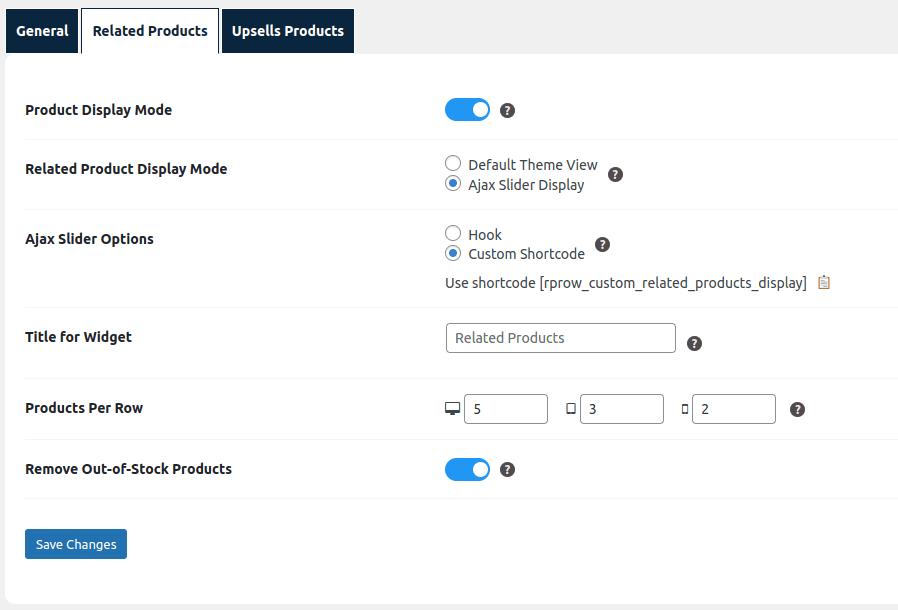
- Product Display Mode: This setting allows admin to Hide Related Products section on Product page. By default related products will be displayed according to the setting provided.
- Related Product Display Mode: This setting allows admin to choose the mode for displaying related products: Default Theme or AJAX Slider.
- Ajax Slider Options: This setting allows user to Opt for a shortcode with or without parameters. If rendered without “id” parameters, the product page will display related products by using the id of the current product.
- Using the button (d), admins can copy a shortcode to paste on any page. This shortcode renders the product’s slider.
- Products Per Row: This setting enables administrators to specify the number of products displayed in the ‘Related Products’ slider for various resolutions, including desktop, tablet, and mobile.
- Title for Widget: This setting allows admin to specify the title admin wants to display for the “Related Products” widget, product slider and products page.
- Remove Out-of-Stock Products : This setting allows admin to include or exclude out of stock products. By default all out-of-stock products are not shown.