
UpSells Products Settings let you manage how upsell products are displayed on product pages. You can choose to show or hide the upsells section, select between the Default Theme layout or a custom Shortcode display, and define how many products appear per row in the AJAX slider. You can also set a custom title for the upsells widget and slider display. These settings provide a consistent presentation across your site while still allowing flexibility through the use of shortcodes.
To access General Settings, go to the WordPress backend menu, click on Related Product Pro > Settings > Upsells Product.
In the Upsells Settings page, you will find 4 sections
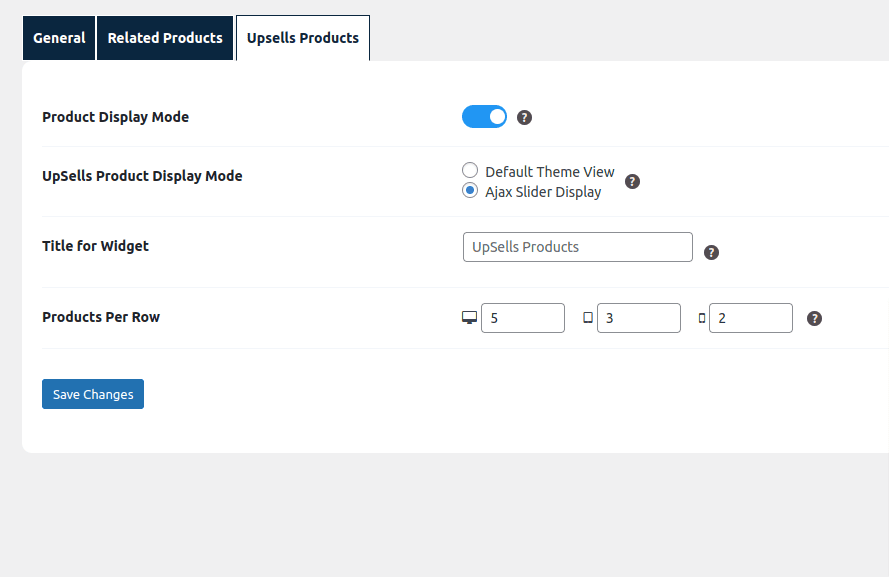
- Product Display Mode: This setting allows admin to Hide UpSells Products section on Product page. By default related products will be displayed according to the setting provided.
- UpSells Product Display Mode: This setting allows admin to choose the mode for displaying related products: Default Theme or Shortcode.
- Title for Widget: This setting enables admin to specify the title admin want to show for “UpSells Products” widget and shortcode.
- Products Per Row: Control how many upsell products appear in a single row of the AJAX-powered slider. The number of products per row can be defined separately for Desktop, Tablet, and Mobile, ensuring optimal layout across all device types..