
The AI Request Logs page provides a comprehensive record of all AI-related requests made through the plugin. This log includes critical details that help admins track and review the requests, ensuring transparency and accuracy in the recommendation process.
To access the log page, find on the WordPress menu Saffiretech Plugins > API Request Logs.
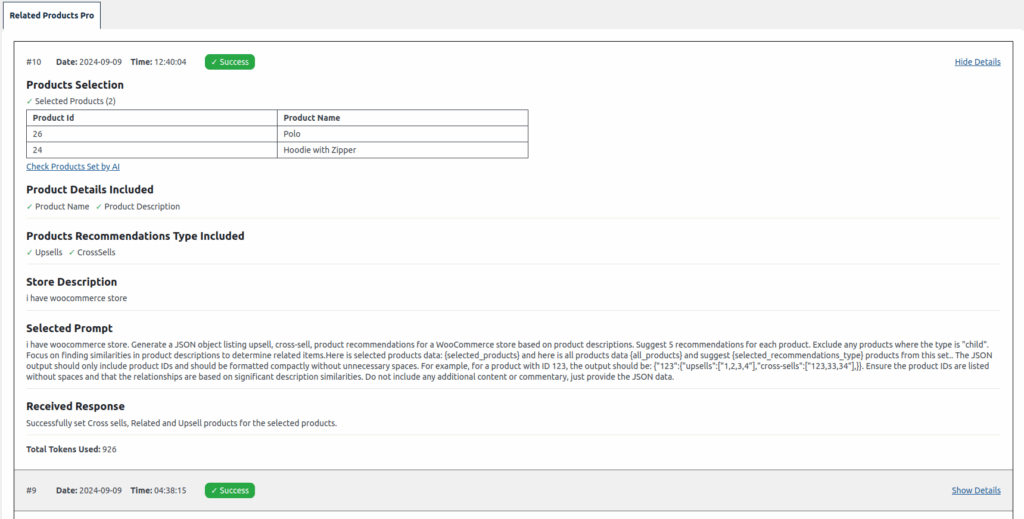
The AI Request Logs page provides a comprehensive record of all AI-related requests made through the plugin. This log includes critical details that help admins track and review the requests, ensuring transparency and accuracy in the recommendation process.
Key Features:
- Date and Time: Each log entry displays the exact date and time when the request was made, allowing you to track the history of AI interactions.
- Request Status: The log shows whether the AI request was successful or failed, with a clear visual indicator (green for success, red for failure).
- Selected Options: Each log entry records the specific options chosen for the request, including whether the admin selected all products, specific categories, or individual products.
- Token Usage: The log provides details on the total number of tokens used for each request, helping you monitor API usage.
- Detailed View: By clicking on the “Show Details” link next to each log entry, you can view a detailed breakdown of the request. This includes the upsells, related products, and cross-sells that were set during that specific interaction.
- Edit Product Recommendations Set by AI: The detailed view also includes a direct link that navigates you to the bulk edit page, where you can review or modify the upsells, related products, and cross-sells product recommendations set by AI for your store.