
All your announcements are not only sent to users via emails but also visible to them on the frontend in a separate Notifications tab on LearnDash Couse page
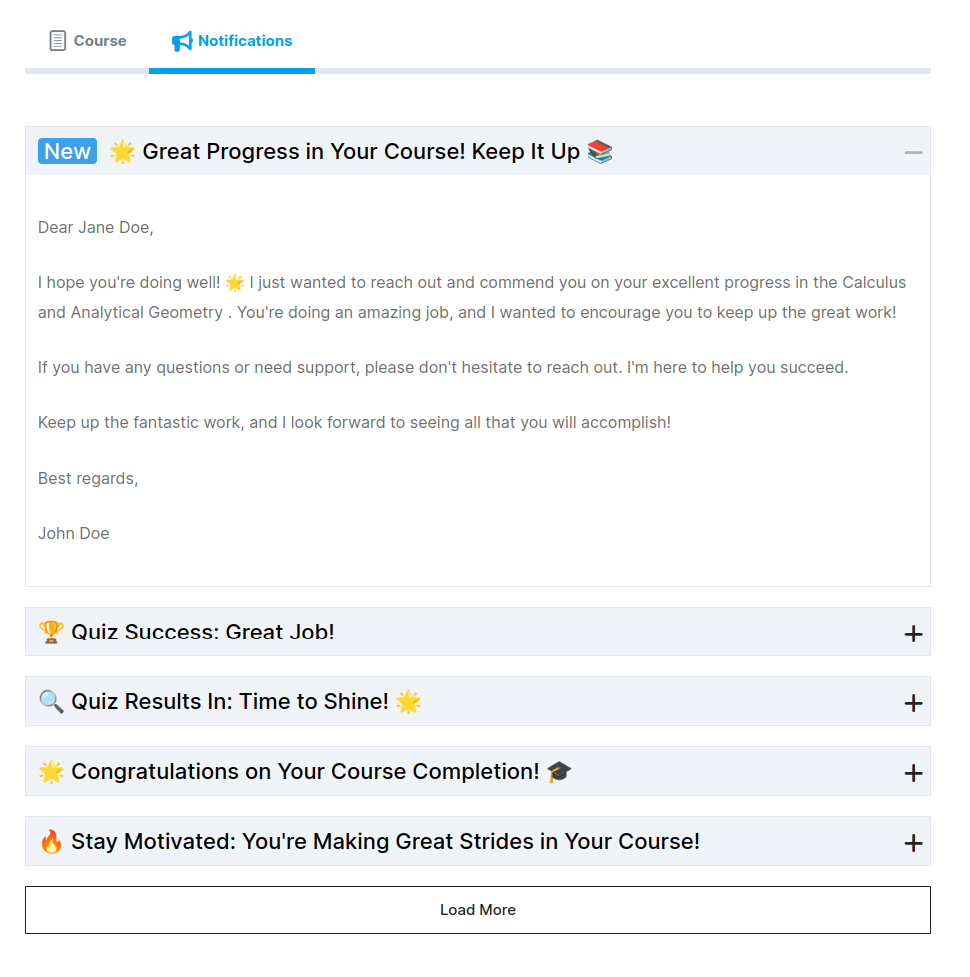
This provides learners with a clean and organized interface to view all course-related updates. The layout is designed to be simple, intuitive, and user-friendly.
Key UI Elements
- Top Navigation Tabs
At the top, users can switch between:- Course
- Notifications (active tab)
- Notification List Display
Each notification is shown as an expandable accordion.- Unread notifications are marked with a blue “New” label for quick identification.
- Each notification includes a title, icon, and short preview.
- Clicking the item expands the full message content.
- Expanded Notification View
When expanded, a notification displays:- Greeting and message body
- Detailed feedback or encouragement
- Sender signature (e.g., instructor name)
- Collapsed Notification Items
All other notifications remain collapsed and show only:- Title
- Category icon
- Expand (+) button
- Load More Button
At the bottom, a “Load More” button allows users to fetch additional notifications using AJAX, ensuring smooth performance and a clean UI.