
Bulk Edit Upsells and Cross-sells for WooCommerce plugin allows you to boost your store sales by generating AI Product Recommendations using ChatGPT and enabling bulk update of WooCommerce UpSells and Cross-sells.
Say goodbye to tedious manual updates and hello to seamless AI-powered WooCommerce product suggestions! With Bulk Edit Upsells and Cross-Sells for WooCommerce, you can effortlessly manage your WooCommerce upsell, cross-sell products across your store. Powered by ChatGPT, our plugin delivers tailored AI product recommendations that elevate your store’s performance in just a few clicks!
For AI functionality, this plugin provides an extensive selection of ChatGPT AI models, including GPT-4o, GPT-4o mini, GPT-4 Turbo, GPT-4, GPT-3.5 Turbo, and many more.
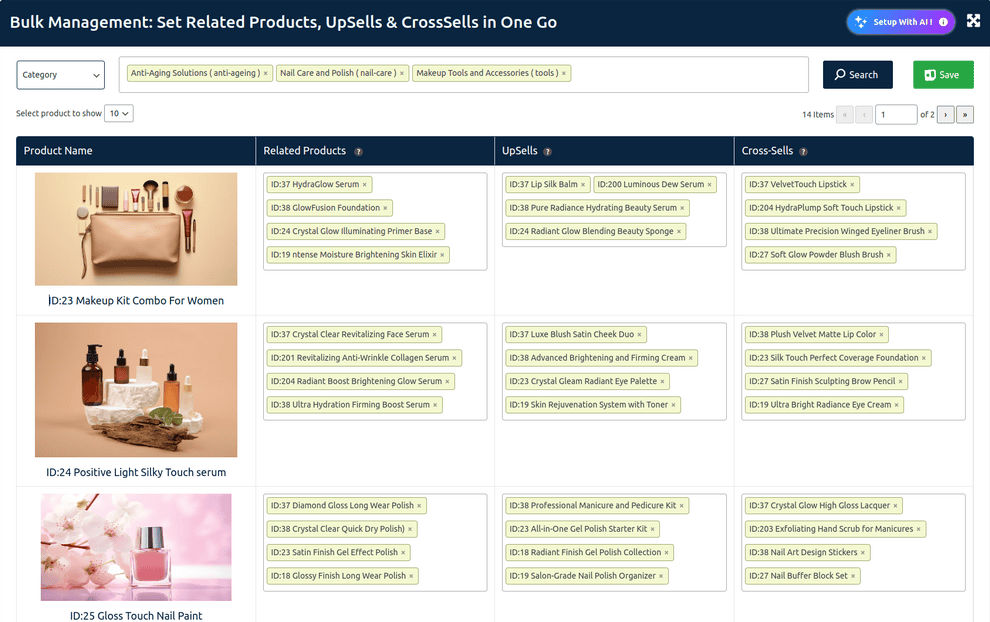
Easily manage Related Products, Upsells, and Cross-Sells from a single screen.
This bulk editor lets store admins efficiently assign product suggestions in bulk, saving time and ensuring consistency across the entire WooCommerce catalog.
Filter & Search Functionality
- Category Filter:
Filter products by category using the dropdown at the top left. - Selected Filters View:
Applied filters appear as tags for quick visibility and removal. - Search Button:
After selecting filters, click Search to view relevant product listings.
Bulk Editing Columns
Each row displays a product with three editable columns:
- Product Name:
Shows the product image, name, and ID for easy identification. - Related Products:
Displays assigned related products with ID and name.
➤ Products can be removed using the ‘×’ icon. - UpSells:
Lists products promoted as upsells. Easily editable inline. - Cross-Sells:
Displays suggested complementary products typically shown in the cart.
Quick Tagging Features
- Use drag-and-drop or select boxes to assign products quickly.
- IDs and titles are clearly shown for each assigned product.
- Each field is editable without leaving the page.
Pagination Support
- Pagination controls are shown in the top-right.
- Navigate between pages using arrows or page numbers.
- The default shows 10 products per page (adjustable via dropdown).
Additional Controls
- Select product to show:
Choose how many products to display per page (e.g., 10, 20, 50). - Save Button (Green):
Save all the changes across Related, Upsell, and Cross-Sell columns in one click. - “Setup With AI” Button:
Opens AI product recommendation wizard for automated suggestions.
This intuitive layout helps you bulk-manage your product relationships quickly, eliminating the need to edit each product manually